Oticon Hearing Aids Reviews

The founding of hearing aid manufacturer Oticon is quite a heartwarming story.

56,000
Times per second in which an Oticon hearing aid scans the environment
The company was established in 1904 by Hans Demant, to create a hearing aid for his wife. He must have succeeded, because today Oticon, now owned by parent company William Demant Holdings, is one of the largest hearing aid companies in the world. Let’s take a dive into a few Oticon hearing aid reviews and see if an Oticon hearing aid is the right choice for you.
Oticon Hearing Aid Features
Oticon hearing aid prices are high (you can expect to pay up to $3,000 per hearing aid), but they come with some top-of-the-line features that make them well worth the price. Oticon makes a range of hearing aid styles, from behind the ear (BTE) and mini-BTE to in-the-ear, half shell, full shell, receiver-in-canal, and in-the-canal hearing aids.
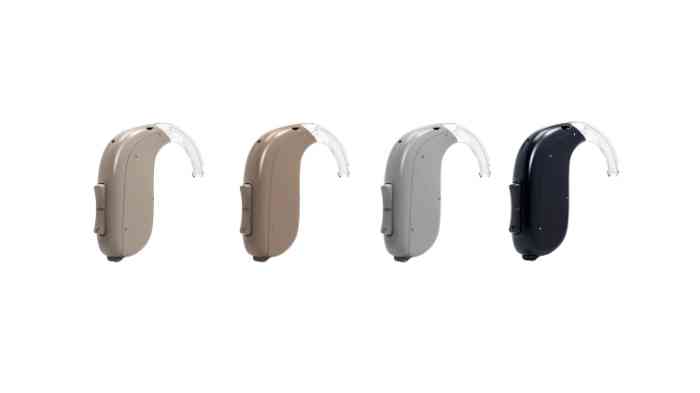
Oticon’s flagship models – the Oticon Opn S, Oticon Opn Play, and the Oticon Opn – all feature BrainHearing technology, including:
- OpenSound Optimizer technology, which scans the environment 56,000 times a second, providing directional sound delivery close to what you’d hear with full hearing.
- Spatial Sound LX, which transmits data between both hearing aids to improve your ability to localize sounds.
- Speech Guard LX, which isolates speech for better understanding and communication, even in noisy environments.
Oticon also offers the ConnectClip, a small device that wirelessly connects to hearing aids, allowing you to stream audio from phones, music players, and television. Compatible with Android and Apple phones, the ConnectClip makes hands-free phone conversations possible.
Oticon Hearing Aid Reviews
The Oticon Opn S
The Oticon Opn S is arguably the most feature-laden hearing aid offered by the company, with full BrainHearing capabilities. The Opn S comes both in a regular-sized behind-the-ear style and as a discreet receiver-in-canal style called the miniRITE.
Feedback is rarely an issue with an Opn S, as the OpenSound Optimizer predicts and prevents feedback before it occurs. The aid’s batteries are rechargeable, with a full charge capable of powering the device for a full day.
Settings are easily altered using the Oticon ON app, which doubles as a smart home hub, allowing you to connect the hearing aid to smart home devices. This allows you to control lights with your voice or receive an alert through your hearing aid when laundry or dishwasher cycles are complete.
The Oticon Opn
Compared to the Oticon Opn S, the Oticon Opn feels a little dated. The hearing aid does have Bluetooth connectivity and simplified versions of BrainHearing and ConnectClip, which still produce excellent sound quality. Most wearers who haven’t experienced the Oticon Opn S will be quite happy with the Opn’s performance.
Like the Opn S, the Opn comes with a smartphone app for setting controls and can be used as a smart home hub. The Opn comes with rechargeable batteries and includes HearingFitness, a feature that analyzes hearing aid usage and environmental factors to display when and how you use the device, allowing you to fine-tune hearing aid settings.
The Oticon Opn Play
Designed for children, the Oticon Opn Play is a sturdy hearing aid available in a wide range of kid-friendly colors. While the Opn Play lacks some of the features of the Opn and Opn S, it’s tough enough to survive the playground and resists the damaging effects of dust, water, humidity, and temperature extremes.
The battery case of the Opn Play is difficult to access. This is an intentional feature, as it reduces the risk children will remove batteries. A light on the hearing aid case notifies adults when battery power is low.
The Oticon Opn Play is also compatible with Amigo FM, a simplified version of the ConnectClip that can be clipped to teachers to stream lessons straight into hearing aids.
The bright color options of the Opn Play appeal to children. Children are more likely to use hearing aids that come in colors they like, and bright colors make the hearing aids more visible.
At $2,300 per hearing aid, the Oticon Opn Play is cheaper than other Oticon BTE devices, and they include features like child-proof batteries and added FM functionality. Overall, the Opn Play is a good choice for a child’s hearing aid.
Oticon Hearing Aid Prices
Oticon hearing aid prices are high, but comparable to other hearing aids of similar quality. Remember, these prices are only estimates. When purchasing hearing aids from healthcare professionals, additional costs (such as fittings and battery charging hubs) may be a factor in the final price.
Oticon Opn: $2,500 per ear
Oticon Opn S: $3,000 per ear
Oticon Opn Play: $2,300 per ear
Pros and Cons of Oticon Hearing Aids
Oticon hearing aid reviews are, for the most part, positive. Some users report that the Opn S suffers occasional sound outages, but this is generally due to ear wax build-up which is common in all hearing aids. As with all hearing-related issues, it’s best to work with a licensed hearing care professional to discover the best hearing aid options for you or your child.
Models
Oticon Ruby | Oticon Xceed | Oticon Opn S | Oticon Siya | Oticon Opn | |
|---|---|---|---|---|---|
Average Price |
$1,600-3,200 |
$2,150-4,200 |
$2,150-4,200 |
$1,600-3,200 |
$1,250-3,200 |
Model Type |
Behind-the-Ear& Receiver-in-the-canal |
Behind-the-Ear |
Behind-the-Ear & Receiver-in-the-canal |
Behind-the-Ear & RITE |
In-the-Ear |
Batteries |
Battery Size 312, 13, Rechargeable (Lithium-ion) |
Battery Size 13, 675 |
Battery Size 312, 13, Rechargeable (Lithium-ion) |
Battery Size 13, 312 |
Battery Size 10, 312, 13 |
Bluetooth |
✓ |
✓ |
✓ |
✓ |
Depending on the model |
Android / iPhone compatibility |
iOS and Android* Compatibility |
iOS and Android* Compatibility |
iOS and Android* Compatibility |
iOS and Android* Compatibility |
iOS and Android* Compatibility |
Tinnitus Relief |
✓ |
✓ |
✓ |
✓ |
no information found |
Water Resistant |
✓ |
✓ |
✓ |
✓ |
✓ |
Produced in |
2020 |
2019 |
2019 |
2018 |
2018 |
*Android connectivity requires an external streamer
Prices can be subject to discounts
Oticon Hearing Aids: Technologies
Oticon hearing aids are some of the most advanced in the world. The company is the second-largest manufacturer of hearing aids on the planet and has conducted extensive research into how the brain processes sound via its Centre for Applied Audiology Research.
Velox Technology Platform
Much of the Oticon hearing aids cost arises from the cutting-edge technology present in its hearing aids. When you pay Oticon hearing aid prices, you gain access to the base Velox technology platform.
This includes several advanced sound processing algorithms. This is the technology behind its BrainHearing platform, which is present within the popular Oticon Opn hearing aids.
BrainHearing is designed to provide you with access to the full soundscape. Its hearing algorithms enable you to process sounds faster and more effectively to deliver a better hearing experience.
The Polaris Platform
The next step in hearing technology comes in the form of Oticon’s Polaris system. This is an improvement on the original BrainHearing approach to hearing.
The main differences are Oticon hearing aids models now come with improved sound processing and a more powerful capacity. According to Oticon, Polaris comes with 16x more capacity than the original Velox system.
Using EEG brain measurements, Oticon has concluded that Polaris delivers an additional 30% more sound to the brain while also improving the clarity of the hearing experience by 60%.
Crucially, the same study revealed that speech understanding is enhanced by 15%.
Artificial Intelligence
The presence of artificial intelligence technology has disrupted a variety of industries. Oticon is changing the game by introducing artificial intelligence into its hearing algorithms from 2021.
When looking at an Oticon hearing aid comparison chart, this new technology would potentially improve modern hearing aids by leaps and bounds.
What does this mean for you?
By making an Oticon hearing aid model comparison, the presence of artificial intelligence and machine learning technologies will dramatically improve sound quality, comfort, and speech understanding.
Dubbed MoreSound Intelligence, Oticon hearing aid reviews praise this new technology for its enhanced sound processing and creating clear contrasts among heard sounds.
This unique process is the holy grail of futuristic hearing aid technology. It won’t be long before ordinary people across the world will be able to take advantage of it.
Oticon Hearing Aids: Models
Oticon premium hearing aids address mild to severe hearing loss. Based on the results of your free hearing test with EarPros, you will be able to choose the model that best suits you.
Oticon hearing aid pricing varies depending on your exact needs, but there’s guaranteed to be a hearing aid to suit you.
Here are the primary models of hearing aid available from Oticon.
Oticon More
This is the most advanced hearing aid offered by Oticon. Oticon More is powered by the latest incarnation of BrainHearing technology with a Deep Neural Network (DNN) powered by the Polaris platform.
Compared to the previous Oticon Opn S, More improves speech understanding by approximately 15%.
This model is fully rechargeable and fits behind the ear. Its Bluetooth connectivity is fully compatible with both iOS and Android devices.
Oticon Opn S
The flagship of Oticon hearing aids for the last few years, it’s remained its most popular hearing aid since 2016. Since the advent of More, Oticon Opn hearing aid cost has dropped significantly, paving the way for more people to upgrade their hearing aids.
Opn S reduces listening effort, improves speech understanding, and ups the overall hearing experience.
The open sound experience of the Opn S mimics the natural hearing experience and can be adjusted to suit the wearer’s level of hearing loss through frequency levels.
Oticon Siya
If Oticon hearing aid cost is a concern for you, the Oticon Siya provides access to top-of-the-range hearing aid technology on a budget.
These hearing aids include a broad range of different technology levels and models. Running on the original Velox platform, these Oticon hearing aids have a variety of styles, including behind the ear and invisible hearing aids.
Oticon released the Siya range of hearing aids to provide more choice to people who don’t have the budget for the most futuristic hearing aids in Oticon’s range.
Oticon Xceed
For people with severe and profound hearing loss, many hearing aids are simply unsuitable.
Oticon Xceed hearing aids are designed for people who need extremely powerful hearing aids. The Xceed is among the world’s most powerful hearing aids, with 146 dB SPL and a full-on-gain rating of 87 dB.
Xceed hearing aids are powered using Velox S and include BrainHearing technology. This is a solution for when you have near-total hearing loss.
Despite this range’s differences, it comes with the same high-performance features as Oticon’s other hearing aids. This includes full Bluetooth connectivity and compatibility with accessories, like TV adapters and remote microphones.
Opn Play and Xceed Play
The company has always been committed to supporting pediatric patients through a series of innovative hearing solutions. With that in mind, Opn and Xceed Play hearing aids from Oticon are designed for children.
Oticon provides four different styles of hearing aid for children suffering from mild to profound hearing loss. Each hearing aid also comes in 12 different fun colors and decorative stickers for children who want to personalize their hearing aids.
Technologies include the Amigo FM microphone and transmitter for school use and the ConnectClip microphone for effective communication with parents, teachers, and other caregivers.
Oticon CROS
Oticon has bundled its technologies into a CROS solution. CROS (Contralateral Routing Of Signal) solutions provide help and support to those who have single-sided deafness.
These hearing aids transmit sound from the deaf ear to the hearing ear, thus enhancing hearing and offering 360-degree sound. This helps users to avoid “head shadow,” whereby sound is blocked from the deaf ear.
CROS vastly improves quality of life and is also compatible with the same features as other Oticon hearing aids.
This is possible through TwinLink technology, which allows CROS hearing aids to be connected to other external audio sources, such as transmitters and Bluetooth devices.
Although not currently available with cutting-edge More hearing aids, Oticon is expected to achieve More compatibility shortly.
Oticon Intent
Oticon Intent is a cutting-edge hearing aid designed to enhance auditory experiences for individuals with hearing loss. Known for its advanced technology, Oticon Intent features superior sound processing capabilities that provide clear and natural sound quality. This device incorporates innovative features such as wireless connectivity, allowing users to stream audio directly from their smartphones and other devices. Additionally, Oticon Intent offers a comfortable, discreet design, making it a top choice for those seeking both performance and convenience in their hearing aids.
Oticon Own
Oticon Own is a range of in-the-ear (ITE) hearing aids designed to provide personalized and discreet hearing solutions. These aids are custom-made to fit the unique contours of the wearer's ear, offering comfort and improved sound clarity. With advanced features like Oticon's BrainHearing™ technology, Oticon Own helps users process sound more naturally by reducing listening effort and improving speech understanding in various environments. The devices also come with wireless connectivity options, allowing seamless integration with smartphones and other devices for a more connected experience.
Oticon Zeal
Oticon Zeal hearing aids are advanced in‑the‑ear devices designed to deliver a natural and well‑balanced listening experience in everyday life. Built on Oticon’s BrainHearing™ approach, they help users stay aware of the full sound environment while keeping conversations clear and easy to follow. These hearing aids offer seamless connectivity with smartphones and other digital devices, allowing direct streaming of calls, music, and media, along with intuitive control through the Oticon Companion app. With their combination of intelligent sound processing, modern connectivity, and user‑friendly features, Oticon Zeal supports a more connected, comfortable, and effortless hearing experience.
Oticon Real
Oticon Real hearing aids are cutting-edge devices designed to deliver a natural and seamless listening experience. Powered by Oticon's advanced BrainHearing™ technology, they enhance sound clarity while reducing unwanted noise, making it easier to follow conversations even in challenging environments. These hearing aids are equipped with features like wind and handling noise reduction, Bluetooth connectivity, and rechargeability for all-day comfort and convenience. Oticon Real focuses on preserving the subtle details of sound, allowing users to engage with the world around them more fully and naturally.
Oticon Hearing Aids: Apps & Accessories
Oticon hearing aid reviews praise the company for the sheer range of apps and accessories available with their hearing aids.
Here’s a brief rundown of some of the options you have with a hearing aid from Oticon. Take note, not all these apps and accessories are compatible with every Oticon model.
ConnectClip Microphone
A small microphone that can be fitted onto a collar. This wireless stereo headset allows you to hear people from a distance. Ideal for noisy environments when you’re getting interference from your surroundings.
ConnectClip also allows you to easily make hands-free calls and alter hearing aid volume remotely.
TV Adapter
The TV adapter can connect to almost any audio device with physical cables. It streams audio directly into your hearing aids from up to 45 feet away.
Plus, you can alter the volume independently.
Oticon Companion App
The Oticon Companion app allows you to have complete control over your hearing aids from your smartphone. Make changes to your hearing aids discreetly via the app, including changing the volume and switching them on and off.
The Oticon app also enables connectivity with Internet-connected devices and other services.
It’s also compatible with smart technology. For example, you can control both your smart thermostat and smart home lighting from your hearing aids.
Oticon Recharger
Oticon Opn hearing aids can be recharged in as little as three hours with the Oticon Recharger. This lithium-ion battery technology helps you to enjoy a full day of hearing without interruption.
Its fast-charge function means you can get six hours of use from your hearing aids from a 30-minute charge.